
When we talk about forensic video work, one thing matters more than anything else: clarity. Every frame counts. Every pixel can make a difference. And this is where camera calibration and lens correction become powerful tools. They help experts see the real scene, not a distorted version of it. They also help forensic teams pull out small details that may stay hidden in raw video.
If you work in forensic analysis, you know that even good cameras can still change how the scene looks. Wide-angle lenses can bend straight lines. Cheap cameras can stretch the edges. And security cameras often distort shapes without anyone noticing. This is why lens correction and camera calibration matter so much.
Why Lens Distortion Happens
Most people don’t notice it, but lenses bend light in different ways. A curved lens can pull the picture in or push it out. That means a person or object in the video may not appear in the correct shape or size. It may even look like it’s leaning or bending.
For everyday photos, this is no big deal. But in forensic analysis, this can create problems. A distorted object may hide its true size. A bent line may look normal unless you know the camera is warping it. Even small distortions can change how evidence is interpreted.
This is where lens correction steps in.
How Lens Correction Helps Forensic Experts
Lens correction removes the geometric distortion created by the camera lens. When done in real-time, it fixes the video as it is being captured. This means the video is cleaner, straighter, and much more accurate from the very first frame.
In forensic work, this matters because:
- Straight lines stay straight
- Measurements become more reliable
- Shapes appear as they actually are
- Evidence looks natural, not stretched
Real-time lens correction helps make sure the video is an honest copy of the real world, not a warped version of it.
Cognitech’s real-time lens correction goes even further. It undistorts the video instantly, allowing the forensic analyst to work with clean footage right away. No time wasted. No guessing what is real and what is distortion.
The Role of Camera Calibration
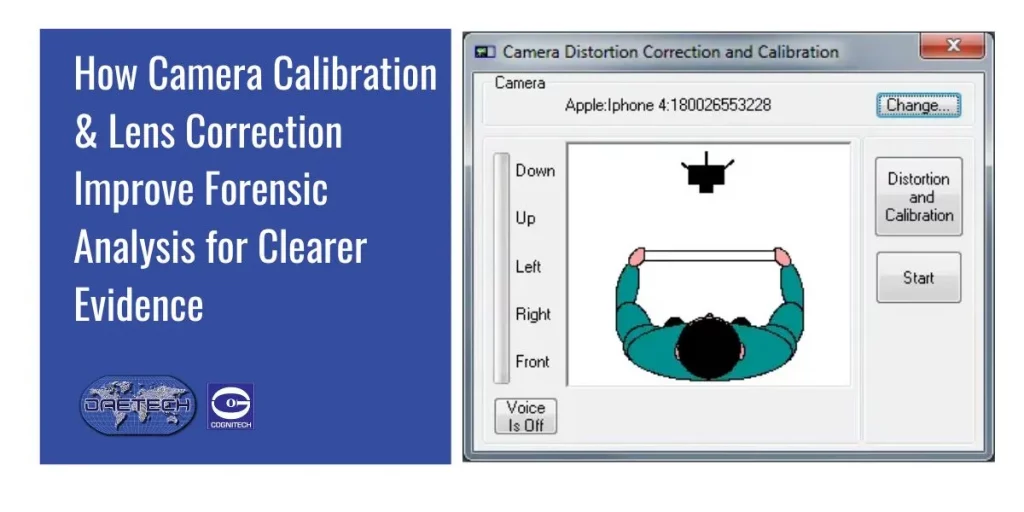
If lens correction fixes distortion, camera calibration teaches the software how the camera behaves. Every camera is different. Each one has its own lens, sensor, and angle. Camera calibration maps these details, so the software knows how to measure the scene accurately.
The automatic Camera Calibration module in Cognitech tools gives constant feedback. This helps the user calibrate the camera with ease, even if they are not highly technical. Once calibrated, the camera can work with Cognitech AutoMeasure to produce accurate distances, angles, and object sizes.
In forensic analysis, this level of precision matters a lot. It helps experts answer questions like:
- How tall is the person in the video?
- How far apart were two objects?
- What angle was the camera at?
Without calibration, these measurements may be off. With calibration, they become trustworthy.

Better Measurements Lead to Better Evidence
When you combine camera calibration and lens correction, you get a clear, accurate video that is ready for measurement and review. This gives forensic teams a huge advantage.
Even small details – like the exact height of a suspect, the distance between cars, or the angle of a door – can become important in court. Clear evidence can shape an entire case. Clean footage builds confidence, both for investigators and for the legal team.
This is why modern forensic labs rely on calibrated cameras, real-time lens correction, and accurate measurement tools. They help turn raw video into solid, reliable evidence.
Enhance Your Forensic Evidence Today
Get trusted software for real-time lens correction and camera calibration. Contact us to upgrade your forensic workflow.
Contact usOther Helpful Tools in the Workflow
Cognitech AutoMeasure software includes other useful modules as well. For example, the Digital VCR playback control protocol allows users to control supported VCRs directly through VideoActive®. This makes it easier to handle older tapes and transfer them into a digital format for analysis. Many forensic cases still involve analog video, so this feature saves time and keeps the chain of evidence safe.
Final Thoughts
Forensic analysis depends on accuracy. And accuracy depends on understanding how cameras shape the images they capture. With strong tools like camera calibration and lens correction, experts can unlock cleaner, truer video and reveal details that matter.
These tools don’t just sharpen the image. They strengthen the evidence.
FAQs
1. What is lens correction in forensic analysis?
Lens correction is the process of removing the distortion created by a camera lens. In forensic analysis, this helps experts see the scene as it truly is by fixing curved lines, stretched shapes, and warped edges. It makes the video more accurate and easier to measure.
2. Why is camera calibration important for evidence?
Camera calibration teaches the software how a specific camera behaves. Once calibrated, the system knows the camera’s angle, lens type, and sensor details. This helps forensic teams make accurate measurements, such as height, distance, and object size, which are crucial for building reliable evidence.
3. How do lens correction and camera calibration work together?
Lens correction removes distortion, and camera calibration provides precise measurement data. When combined, they produce clean, accurate video that reflects the real scene. This helps forensic experts review footage without guessing or correcting errors later.
4. Does real-time lens correction improve video capture quality?
Yes. Real-time lens correction fixes distortion during the live capture, not afterward. This gives forensic analysts a clear and undistorted video from the start. It also saves time and reduces errors since the footage is already corrected before entering the analysis workflow.